
Building a mobile app to engage employees involves understanding your workforce's needs, identifying key features, selecting the right development approach, and designing an intuitive user interface. The app should integrate with existing company tools and systems, ensure security and compliance, and be continuously tested and improved based on feedback. Once ready, it should be effectively launched and promoted, and its success should be regularly measured and evaluated.
The gap between an engaged workforce and a disengaged one often comes down to whether employees have the right tools to do their jobs and feel connected to the people around them.
A well-built employee engagement app closes that gap.
A company mobile app gives your workforce a single place to communicate, access schedules, submit requests, get recognized, and stay connected to what's happening across the organization, on the devices they're already carrying.
Building one that actually gets used, though, requires more than picking the right features.
It requires understanding your workforce, choosing the right development approach, and making sure the app fits inside the technical environment your IT team already manages.
Let's look at how to build the tools that reflect your culture and keep your people connected. Since 2014, Median.co has built over 1.7 million apps across iOS and Android, and the best practices in this guide reflect what we've learned about what actually works for workforce apps at scale.
Key takeaways
Employee engagement apps enhance business success by fostering a positive workplace culture and providing a mobile-first platform that boosts communication, collaboration, recognition, performance management, and feedback mechanisms.
The development of an employee engagement app involves a series of steps from identifying core features to launching and promoting the app, with a focus on continuous testing, measuring success through various benchmarks, and iterating based on employee feedback to optimize user experience.
Effective employee engagement apps should integrate seamlessly with your company’s existing tools, be designed with an intuitive and personalized user interface, and ensure high security and compliance with regulations such as GDPR to protect employee data.
Understanding the need for employee engagement apps
Engaged employees are key to a successful business. If employees feel valued and involved, they tend to be more productive and happy.
This leads to recorded benefits like better customer retention, higher employee engagement, and lower absenteeism.
Gallup’s State of the Global Workforce 2026 report estimates that low employee engagement costs the world economy an estimated $10 trillion in lost productivity.
Though, the Gallup findings also prove that engaging a diverse workforce, including remote employees, can be tough. That's where employee engagement apps come in.
They simplify tasks like payroll and rostering, and help team members communicate better, leading to better outcomes.
Tip: Remember, an effective employee engagement app should be user-friendly and meet the specific needs of your team. It's not just about the technology, but about designing something that helps you foster a positive, collaborative, and inclusive workplace culture.
Employee engagement app features: Identifying what you need
When you're choosing an employee engagement app, think about what really makes your people feel part of the team.
An employee engagement app with strong adoption usually includes a way for people to message each other, a system for giving and getting rewards, tools to manage performance, and a way for people to give feedback in real time.
Communication and collaboration tools
An employee engagement app is important for good communication among employees. To help with this, your app can incorporate instant messaging tools, push notifications and/or company news feeds.
These help to share important updates quickly and let employees talk to each other. This is common in the employee apps featured in our app Examples library.
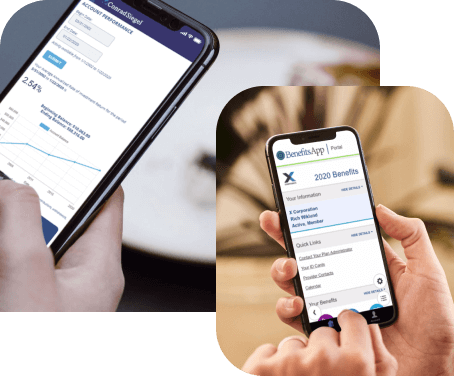
Your app can also have features for teamwork. These can include task assignment, file sharing, and automated requests to human resources. These features make working together easier and help everyone do more work in less time. You see this a lot in frontline employee mobile apps and retail-focused employee engagement apps. Snap Schedule 365 Employee Scheduling, MyMcKesson, and BenefitsApp are examples of apps built using Median.co for this purpose.
Tip: A well-designed employee engagement app not only simplifies tasks but also fosters a positive, inclusive workplace culture. Remember, it's not just about the technology, it's about how it enhances communication and collaboration within your team.
Recognition and rewards system
Employee recognition and rewards programs are crucial for motivating employees and promoting a positive company culture.
A carefully designed system of acknowledgment, such as a ‘kudos’ feature or incentives for meeting goals through an engagement app, can greatly increase employee satisfaction and productivity.
The use of gamification elements in apps, in combination with public recognition, can elevate employee engagement levels while also inspiring other members within the organization to strive towards excellence.
This creates a cycle of continuous improvement driven by mutual appreciation among employees and project management.
My article on building captivating gaming apps examines the features and patterns many successful apps have in common, and could be a useful reference as you consider engagement-focused features for employees.
Tip: An effective employee engagement app should be intuitive, engaging, and meet the unique needs of the employees engaged on your team. It's about fostering a positive, collaborative, and inclusive workplace culture.
Performance management and feedback
The functionality of performance management and feedback is a crucial aspect of an effective engagement app. This feature supports skill development by establishing specific, measurable, achievable, relevant, and time-based goals.
It also provides regular opportunities for evaluation of valuable insights and feedback that align personal ambitions with company objectives.
Advanced capabilities like mobile accessibility allow individuals to access the app on-the-go, while customizable workflows enable tailoring to suit different needs.
Dedicated spaces within the app specifically designed for mentorship or coaching can enhance overall effectiveness in managing employee performance.
To sum up:
Performance management and feedback functionality is crucial for an effective engagement app.
It supports skill development and aligns personal ambitions with company objectives.
Advanced capabilities like mobile accessibility and customizable workflows cater to different needs.
Dedicated spaces for mentorship or coaching enhance the app's effectiveness.
Discover how Median empowers companies to speed mobile app development, engage users, and reduce expenses.

Choosing the right employee mobile app development approach
After you've figured out what your employee engagement app needs to do, it's time to decide how to build it.
You can make the app yourself, hire someone else to do it, or use a platform that helps you build apps. Each choice has its own pros and cons.
Building the app yourself means you have total control over what it does and how it looks. But, it can be expensive and time-consuming.
Hiring someone else to build the app can save you time and might give you access to more specialized skills, but, you might not have as much control over the final product.
Using an app development platform can be a good middle ground. It can help you get your app to the market faster and work on different operating systems. But, it might cost more upfront and you might have to share some of your profits with the platform.
In-house native app development
Opting to develop an app in-house offers the advantage of maintaining complete control over its quality, features, and design. This ensures that all elements align with your company’s objectives.
It promotes a shared goal among team members, and may facilitate smooth collaboration with easier communication capabilities.
One must consider the substantial costs associated with forming and sustaining an internal team as well as challenges related to finding and retaining skilled developers.
Tip: Tip: A well-crafted employee engagement app can boost productivity and foster a positive work culture. Remember, it's not just about the technology; it's about creating a tool that truly meets your team's needs and simplifies their work interactions.
Outsourcing your employee mobile app development
Outsourcing the creation of an engagement app can offer access to specialized expertise. It eliminates the time-consuming tasks of hiring and setting up infrastructure, while allowing for flexibility in choosing specific skills for each project.
It's crucial to keep an eye on the quality of the development process when outsourcing, and make sure you have ongoing contracts to ensure continuous service.
Tip: A well-crafted employee engagement app can boost productivity and foster a positive work culture. It's not just about the technology, but about creating a tool that truly meets your team's needs.
Building an app with a web-to-app development platform
Mobile app development platforms offer a uniform setting for creating apps that can run on various operating systems, such as Android, iOS, Windows, and Linux.
They also support cross-platform development through open-source tools. These platforms have the potential to shorten the product launch time significantly while providing offline functionality for apps.
Critically, your app needs to work inside whatever MDM environment is already in place, handling certificate requirements, respecting VPN enforcement, and supporting managed app configuration. These are requirements that surface in procurement and in the first weeks of deployment.
A webview-based approach lets your existing web team own the product while a platform like Median.co handles the native layer, including push notifications, biometrics, MDM compatibility, and enterprise security controls.
It is important to note that utilizing web-to-app conversion platforms may involve substantial initial expenses and potentially sharing profits with them in exchange for their services.
Cost to build an app for employee engagement
As I’ve hopefully conveyed, deciding how to build your employee app is as much a cost decision as it is a technical one.
In-house development gives you control but carries the overhead of hiring, onboarding, and maintaining a mobile team across two platforms.
Outsourcing trades that overhead for external expertise, but introduces its own coordination costs.
Before you commit to either, it's worth understanding what each actually costs in practice.
How much does it cost to outsource app development vs. build in-house?
Designing an intuitive user interface for employee engagement
Creating an intuitive user interface goes beyond just having a visually appealing design. It involves creating a seamless experience for users.
By ensuring consistency in visual elements like fonts and colors, not only is usability improved but predictability for users as well. Incorporating familiar gestures and patterns along with features such as an easy log-in process can greatly enhance the overall user experience.
Tip: To ensure success, your employee engagement app should be intuitive, engaging, and tailored to meet your team's unique needs. It's not just about the technology, but about fostering a positive, collaborative, and inclusive workplace culture.
The application should have responsive design that remains engaging across different devices to maintain a high level of responsiveness. It should also be personalized to reflect the company’s unique branding including their logo and chosen color scheme.
Content segmentation based on employee roles and preferences will add value by increasing engagement among employees using the app.
Related Article: What is an app splash screen & how should I design one?
Integrating with existing company tools and systems
A successful employee engagement app must seamlessly integrate with your company’s existing tools and systems.
Compatibility, robust interaction between systems, automation of processes, and efficient management of top employee engagement apps and data are all crucial factors to consider.
By integrating employee communication and channels into one central hub through the app, employees can avoid information overload and improve their well-being.
All important company information can be accessed through a well-integrated app, leading to time savings and increased productivity for employees.
To ensure a smooth transition and voluntary adoption of the app by employees in line with BYOD policies, careful planning should go into onboarding procedures.
This will help facilitate easy access and integration of the employee engagement app within existing operations while promoting its effectiveness as a tool for enhancing overall employee satisfaction levels.
Designing safe mobile apps: Ensuring security and compliance
Employee engagement apps handle real workforce data, shift schedules, performance records, benefits information, and internal communications, and that data needs to be protected at every layer.
For organizations operating under GDPR, that means explicit consent mechanisms, clear data retention policies, and the ability to fulfill deletion requests.
For US-based employers, CCPA applies to California employees.
For healthcare or government-adjacent workforces, HIPAA or FedRAMP requirements may come into play depending on what the app touches.
The compliance question also extends to how the app is deployed. If employees are accessing the app on personal devices under a BYOD policy,
MDM tools like Intune and Jamf can separate corporate app data from personal content without giving IT visibility into employees' private activity, which matters both for compliance and for employee trust during enrollment.
To maintain a high level of security, your in-house or outsourced developers should:
Use cutting-edge security technologies like biometric authentication
Determine secure hosting solutions
Institute stringent guidelines for login credentials
These measures are crucial for preventing unauthorized access and protecting company assets.
Adequate due diligence in selecting employee engagement solutions, including robust security vetting, is essential to prevent data breaches and ensure compliance.
Testing and iterating your employee engagement app
Evaluating and perfecting your app for employee engagement is a critical step in ensuring its effectiveness and reliability.
Utilizing beta testing allows for feedback from the target audience, as well as real-world assessments of the app’s performance to uncover any hidden glitches that may not have been detected during lab testing.
There are various types of beta testing, such as open, closed, technical, focused, or marketing-based tests, which can provide extensive input and cater to specific needs.
Involving real users in usability tests plays an essential role in continually refining the design process by enhancing user interfaces and overall experience.
Tip: A successful employee engagement app should be intuitive, engaging, and meet the unique needs of your and other team members. It's about fostering a positive, collaborative, and inclusive workplace culture.
It's essential to regularly gather feedback from employees to ensure the app aligns with their needs. This enables continuous evaluation and refinement of the app.
Actively incorporating employee feedback into the app's development creates an iterative process that continually improves the app's effectiveness and usability.
The end result will be an engaging platform tailored specifically to their needs.
Launching and promoting your employee engagement app
Careful planning is essential when launching and promoting your employee engagement app.
To generate excitement and interest among employees, consider hosting a company-wide event or creative kickoff to introduce the app.
Providing training and support in various formats such as virtual sessions, workshops, or video tutorials can help familiarize employees with the features of the new employee app.
After downloading the app, it’s crucial for effective onboarding processes to ensure that all employees understand how to use it effectively.
Tip: An effective employee engagement app is not just about technology. It's about fostering a positive, inclusive workplace culture and meeting your team's specific needs.
Using push notifications existing company apps can be an efficient way to quickly communicate important company announcements and emergency alerts across all levels of staff members.
Emphasizing tangible benefits like time savings, improved efficiency, and enhanced collaboration through utilizing this engagement application may inspire more active participation from users.
A soft launch strategy allows for specific improvements. These are tailored towards enhancing sustained value growth and encouraging greater interaction with the software tool.
Related Article: What is a go-to market app strategy? How to build one in 7 steps
Measuring the success and impact of your employee engagement app
Once your employee engagement app is ready, it's important to measure its success.
You can do this by looking at things like how many employees recommend the app, how often employees are absent, how long employees stay with the company, and how productive they are. You can also gather employee feedback.
Many modern employee engagement apps use artificial intelligence to suggest ways to improve communication and content.
If you connect the app to your HR system, you can combine data on employee engagement with other HR data.
Fact: According to a Gallup study, companies with highly engaged workforces outperform their peers by 147% in earnings per share. Furthermore, organizations that score in the top 20% in engagement realize a 41% reduction in absenteeism, and 59% less turnover of the entire workforce.
This gives a full picture of how satisfied your employees are.
Employee engagement apps can also improve how staff work together, because they provide a single place for communication and collaboration.
To make sure the app continues to work well, you should always be open to feedback from employees. You should also regularly check how satisfied employees are with company apps and make improvements to the app based on this feedback.
This will help to keep employees involved and satisfied with their work.
Top 3 best employee engagement apps
Let's take a look at some of the best employee engagement apps out there, all of which were built using Median.co, a leading platform for app development.
Whole Foods Market: Frontline employee engagement at scale
Whole Foods Market's Innerview app is a frontline employee mobile app built to keep more than 91,000 store associates connected across hundreds of locations.
Employees use it to access shift schedules, receive real-time updates, and communicate across teams, without their web development team needing to hire a single iOS or Android developer.
For a retailer managing a large, distributed workforce, having a centralized mobile tool that fits inside their existing IT environment is what separates an app that gets adopted from one that doesn't.
This is a strong example of a retail-focused employee engagement app that scales without a dedicated mobile team behind it.
MyMcKesson: Enterprise workforce communications
MyMcKesson gives McKesson employees a single place to access company resources, stay current on internal news, and connect with colleagues across a large, distributed organization.
The McKesson case study is a good reference for teams working with SharePoint who want to extend their existing intranet into a native mobile experience without rebuilding it from scratch.
BenefitsApp: Simplified benefits access for employees
BenefitsApp does one thing well: it gives employees straightforward access to their benefits information on mobile.
For HR teams managing open enrollment, policy changes, or onboarding, having benefits documentation in a native app rather than a PDF link buried in an email meaningfully improves how employees engage with that information.
The BenefitsApp case study covers how the team got to market faster by building on Median.co rather than starting from scratch.
Hospitality and retail: Where frontline engagement apps matter most
Hospitality and retail workforces have some of the highest turnover rates of any industry, and a lot of that churn traces back to communication gaps, scheduling friction, and employees feeling disconnected from the broader organization.
A hospitality employee engagement app needs to work on the device an employee already carries, load quickly during a shift, and surface the information that's actually relevant to their role, whether that's a schedule change, a policy update, or a recognition from a manager. The same applies to retail.
A retail employee engagement app that frontline workers actually open every day tends to be one that's tied to a task they already do, not one that requires a behavior change to find value in.
Median.co's platform is well-suited to both verticals.
Your existing web property becomes the app, which means your HR or ops team can update content without a deployment cycle, and your IT team can manage the app inside the same MDM environment they already use for every other corporate tool.
See more examples in the Median.co app library or explore our native plugin library to see what's available out of the box.
Frequently asked questions about employee mobile apps
How much does it cost to build an app?
The cost of building an app can range from $10,000 to over $500,000 depending on the level of complexity and features it requires.
How do I download an employee app?
For publicly listed apps, employees can download directly from the App Store or Google Play Store by searching for the app name or following a link from their employer. For internal workforce apps that aren't publicly listed, distribution works differently. IT teams can push the app directly to enrolled devices through MDM platforms or distribute it privately through Apple Business Manager or managed Google Play, so employees never need to search for it at all.
If you're building an internal employee app and want to understand your distribution options before you launch, private app distribution through the app stores gives you more control over who can access the app, how updates get pushed, and how IT manages the install across a mixed device fleet.
Here's how to distribute a private employee app through the App Store and Google Play: What is a private app, and how do I distribute it?.
What are the key considerations when choosing employee apps?
When choosing employee apps, it's important to consider factors such as ease of use, integration with existing systems, security, customization options, and the specific needs and preferences of your employees. It's also beneficial to select an app that provides comprehensive features for communication, collaboration, recognition, and feedback.
Should I test deep links before deploying an employee app?
Yes. Testing deep links before deployment helps ensure employees are directed to the correct screens, documents, and workflows. A deep link tester like the Median Deep Linking Validator can help verify your Universal Links and Android App Links are configured correctly and working as expected across devices.
*DISCLAIMER: This content is provided solely for informational purposes. It is not exhaustive and may not be relevant for your requirements. While we have obtained and compiled this information from sources we believe to be reliable, we cannot and do not guarantee its accuracy. This content is not to be considered professional advice and does not form a professional relationship of any kind between you and GoNative.io LLC or its affiliates. Median.co is the industry-leading end-to-end solution for developing, publishing, and maintaining native mobile apps for iOS and Android powered by web content. When considering any technology vendor we recommend that you conduct detailed research and "read the fine print" before using their services.*